> ## Documentation Index
> Fetch the complete documentation index at: https://docs.cxconnect.ai/llms.txt
> Use this file to discover all available pages before exploring further.
# Workbench
> The Workbench is where you compose, enrich, and translate messages. You can create multiple workbenches, name them as needed, and configure each with the available features.
# Workbench
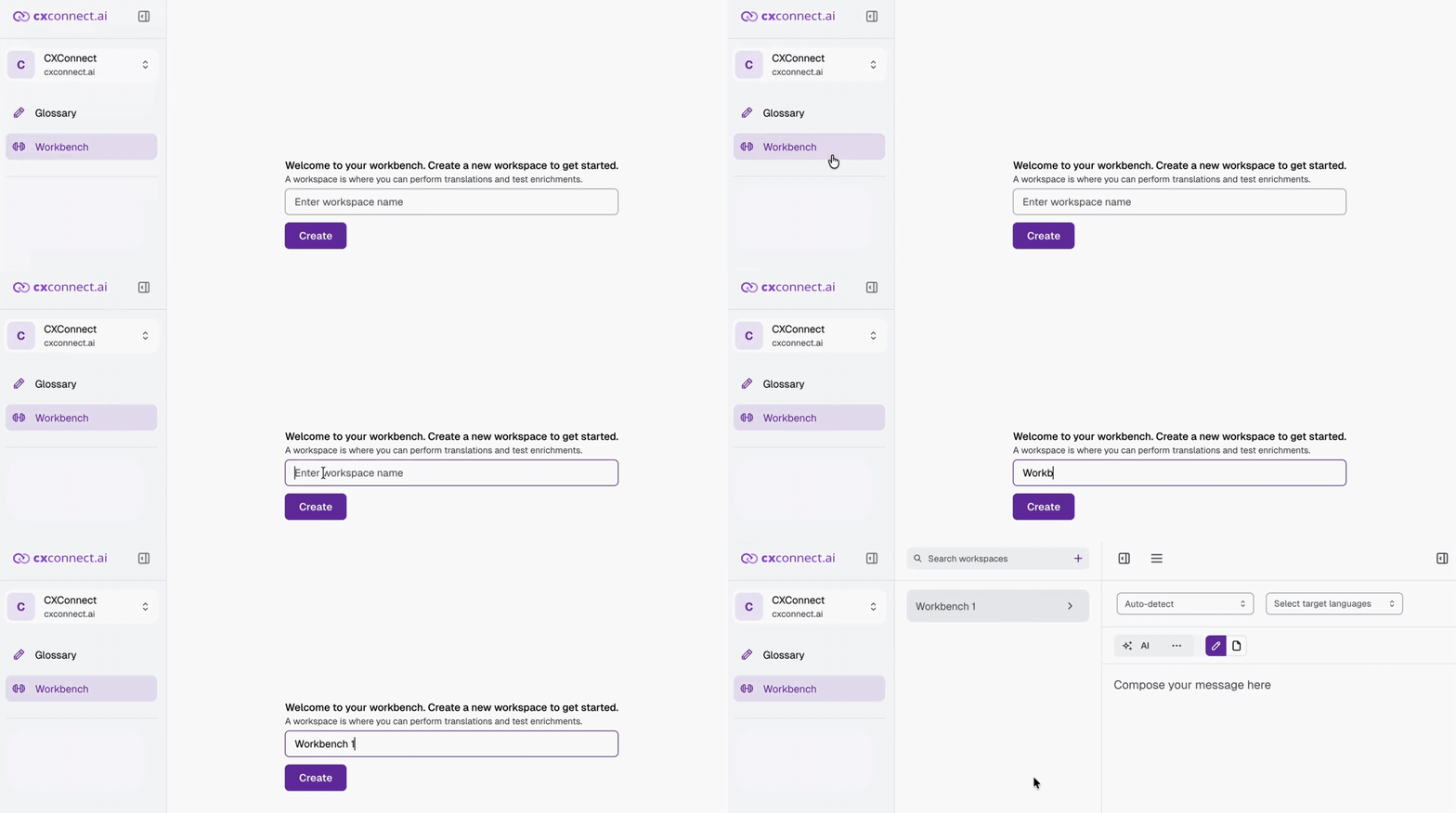
## How to Create a Workbench
1. **Log in** to [**Studio**](https://studio.cxconnect.ai/).
2. From the sidebar, select **Workbench**.
 ## Features
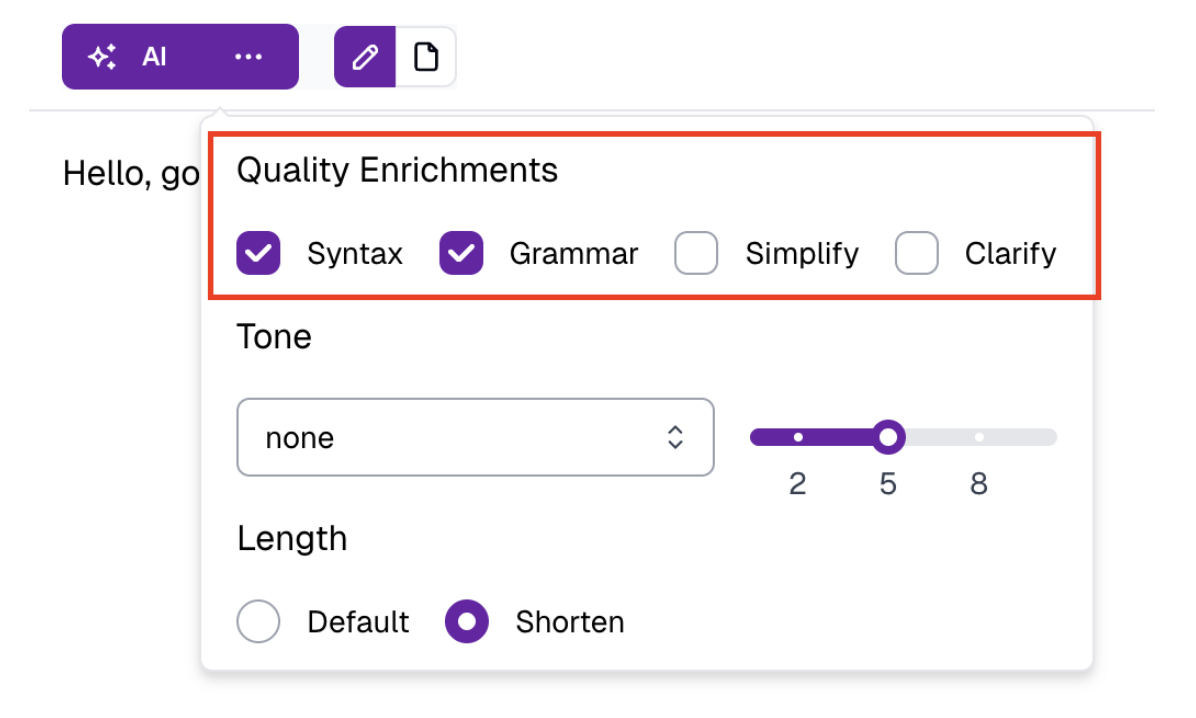
### 1. Quality Enrichments
Enhance the clarity and accuracy of your **message** before translation. Applying these enrichments to the original draft ensures better input and, in turn, higher-quality output.
* **Syntax**
* **Grammar**
* **Clarity**
* **Spelling**
## Features
### 1. Quality Enrichments
Enhance the clarity and accuracy of your **message** before translation. Applying these enrichments to the original draft ensures better input and, in turn, higher-quality output.
* **Syntax**
* **Grammar**
* **Clarity**
* **Spelling**
 **How to use:**
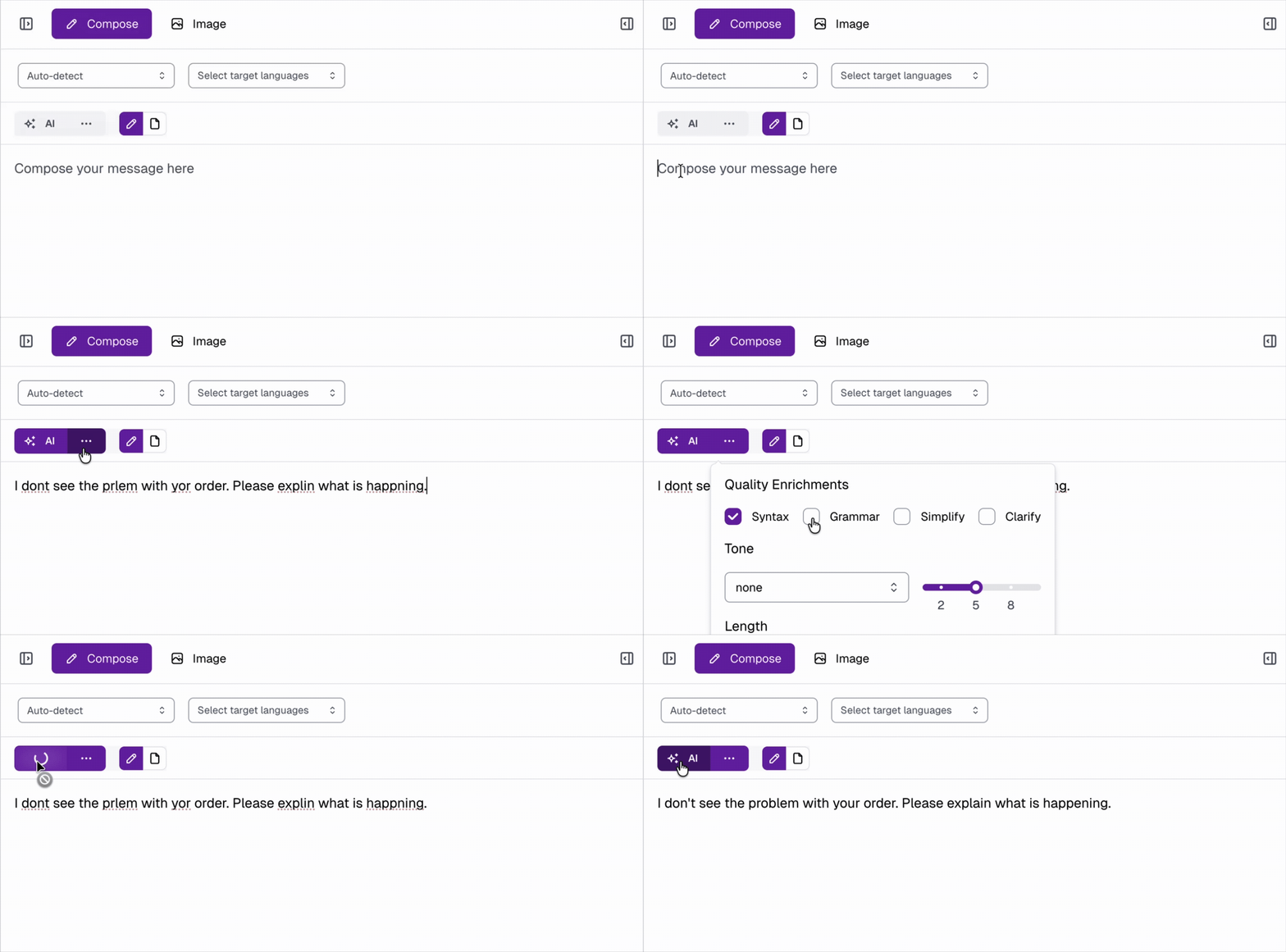
1. Click the **ellipsis (···)** next to the **AI button** to configure enrichment settings.
2. After composing your **message**, click the **AI button** to apply them.
**How to use:**
1. Click the **ellipsis (···)** next to the **AI button** to configure enrichment settings.
2. After composing your **message**, click the **AI button** to apply them.
 **Examples:**
**Syntax, Grammar**
* **Input:**\
I dont see the prlem with yor order. Please explin what is happning.
* **Output:**\
I don't see the problem with your order. Please explain what is happening.
**Clarity, Spelling**
* **Input:**\
My dog ran away and now missing. House is empty. Why and where is my dog. I'm looking. Not able to find.
* **Output:**\
My dog has gone missing. I'm looking for him, but I can't find him. He ran away from home and now the house feels empty. I don't know why he left or where he went.
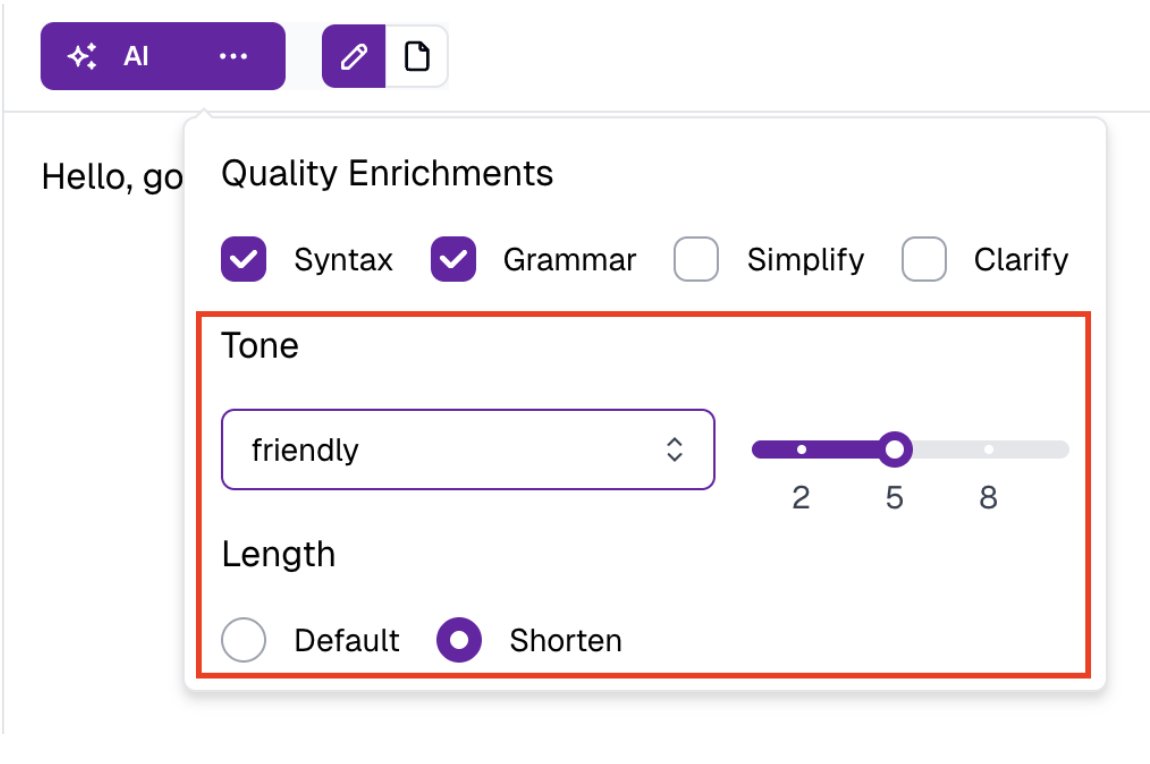
### 2. AI Enrichments
Refine the **style and structure** of your **message** to ensure a polished, consistent tone.
* **Conversation Tone**
* Manages **formal vs. informal pronouns** in languages that distinguish them.
* Maintains a **consistent tone**, regardless of agent writing style.
* **Shorten**
* Adjust the length of drafted **messages**
* Useful for refining **messages** pasted from other sources (e.g., knowledge bases) that may be too long or overly formal.
**Examples:**
**Syntax, Grammar**
* **Input:**\
I dont see the prlem with yor order. Please explin what is happning.
* **Output:**\
I don't see the problem with your order. Please explain what is happening.
**Clarity, Spelling**
* **Input:**\
My dog ran away and now missing. House is empty. Why and where is my dog. I'm looking. Not able to find.
* **Output:**\
My dog has gone missing. I'm looking for him, but I can't find him. He ran away from home and now the house feels empty. I don't know why he left or where he went.
### 2. AI Enrichments
Refine the **style and structure** of your **message** to ensure a polished, consistent tone.
* **Conversation Tone**
* Manages **formal vs. informal pronouns** in languages that distinguish them.
* Maintains a **consistent tone**, regardless of agent writing style.
* **Shorten**
* Adjust the length of drafted **messages**
* Useful for refining **messages** pasted from other sources (e.g., knowledge bases) that may be too long or overly formal.
 **How to use:**
1. Click the **ellipsis (···)** next to the **AI button** to configure AI enrichment settings.
2. After composing your **message**, click the **AI button** to apply them.
**How to use:**
1. Click the **ellipsis (···)** next to the **AI button** to configure AI enrichment settings.
2. After composing your **message**, click the **AI button** to apply them.
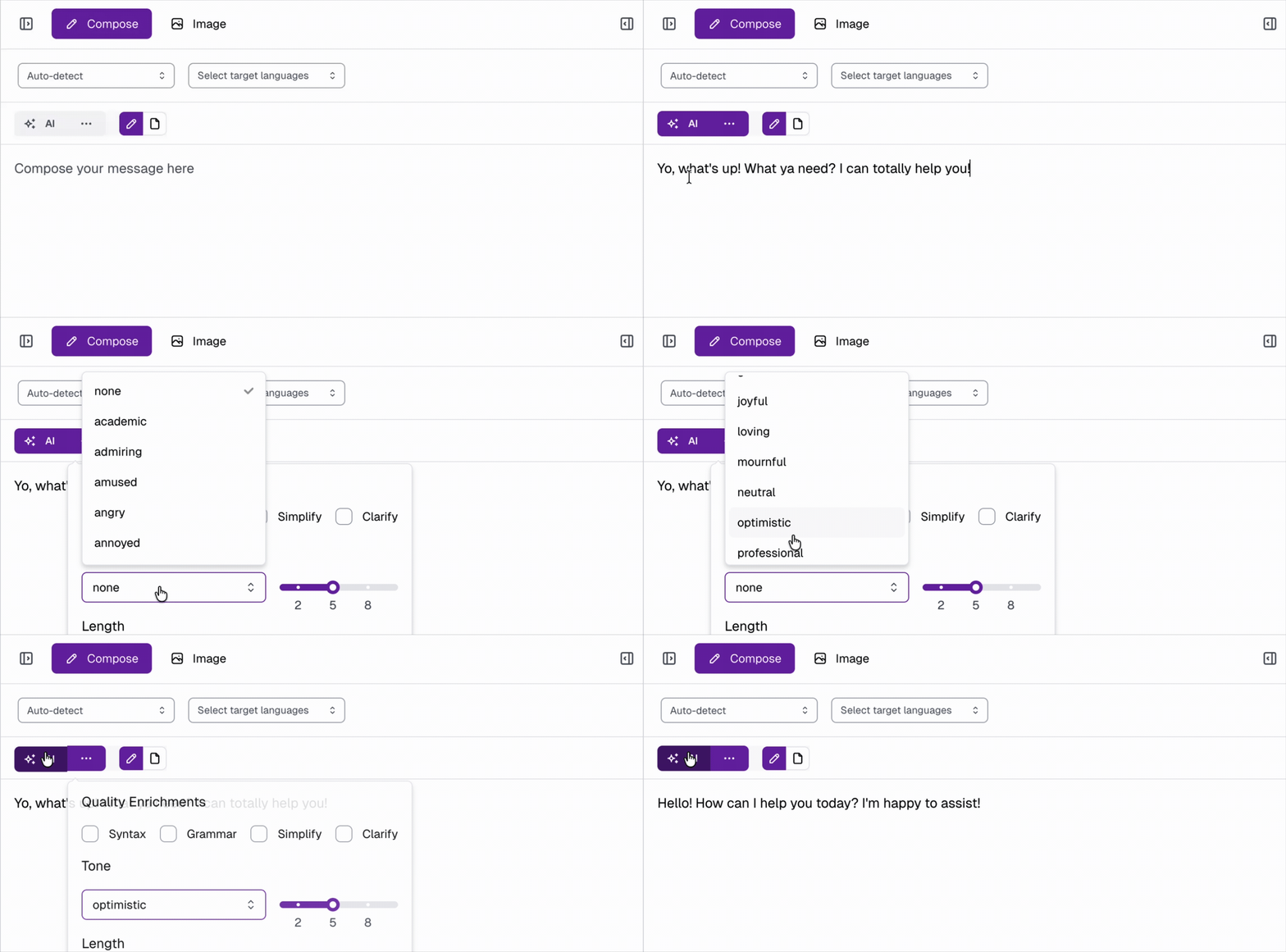 **Examples:**
**Friendly Tone**
* **Input:**\
Yeah? What do you want?
* **Output:**\
Hey there! What can I do for you?
**Shorten**
* **Input:**\
Custom phrases allow users to control how specific words or phrases are translated.
* **Output:**\
Custom phrases let users control translations of specific words or phrases.
## Translating Your Message
Once you’re satisfied with your composed **message**:
1. Select one or more **target languages**, then click **Submit** to translate.
2. Open the **right-hand pane** by clicking the **Drawer Toggle**
3. From this pane, you can view the following details of the translated message *(each can be turned off if needed)*:
* **Sentiment**
* **Translation**
* **Category**
* **Moderation**
4. To view translations side by side with your composer, click the **Pin button** from the translation view.
**Examples:**
**Friendly Tone**
* **Input:**\
Yeah? What do you want?
* **Output:**\
Hey there! What can I do for you?
**Shorten**
* **Input:**\
Custom phrases allow users to control how specific words or phrases are translated.
* **Output:**\
Custom phrases let users control translations of specific words or phrases.
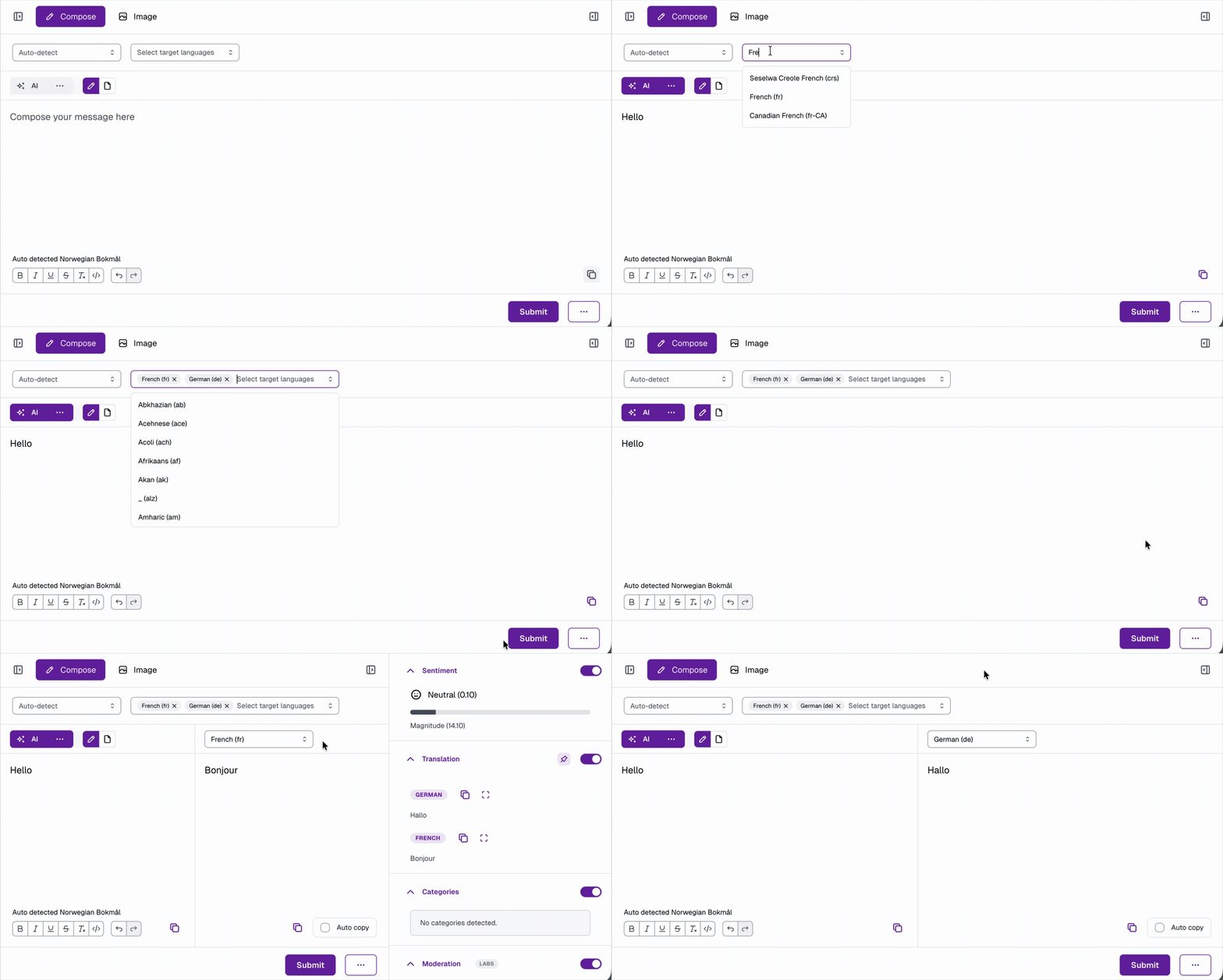
## Translating Your Message
Once you’re satisfied with your composed **message**:
1. Select one or more **target languages**, then click **Submit** to translate.
2. Open the **right-hand pane** by clicking the **Drawer Toggle**
3. From this pane, you can view the following details of the translated message *(each can be turned off if needed)*:
* **Sentiment**
* **Translation**
* **Category**
* **Moderation**
4. To view translations side by side with your composer, click the **Pin button** from the translation view.
 If you need additional assistance or have questions, feel free to reach out to us at [**help@cxconnect.ai**](mailto:help@cxconnect.ai)